


HOW TO DISPLAY CURRENT CRYPTOCURRENCY LIVE-TICKER ON YOUR WEBSITE?
Steps to display cryptocurrency live ticker on your website:
1 Go here cryptonator-widget.
2 Choose "Multi-currency widget"
3 You can add more currencies
4 Change the look & the feel of your widget (background color, width, Font ...)
2 Choose "Multi-currency widget"
 |
| Choose "Multi currency widget" |
3 You can add more currencies
 |
| Add more currencies |
 |
| Change look & the feel |
 |
| Copy the widget code |
6 Integrate the code on Blogger
 |
| Click "Layout" on left then add a gadget in your "Sidebar" |
 |
| Choose "HTML/Javascript" then paste the code and click save |
7 Integrate the code on WordPress

|
| Click "customize" under Appearance then choose "Widgets" |
 |
| Select "Main Sidebar" then click "Add a Widget" |
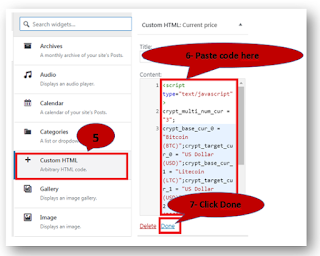 |
| Select "Custom HTML" then paste the code and click "Done" |






0 Comments